
| JHDL Doc Home Page | User's Manual Home Page |
Table of Contents
Here is one example of how to check for multiple cells driving the same wire in a circuit:
import byucc.jhdl.DRC.*;
import byucc.jhdl.DRC.Rules.*;
...
MultiplePutsCircuit my_MultiplePutsCircuit = new MultiplePutsCircuit(this,
i, explicit_clock, o);
DesignRuleChecker.checkRule(this, my_MultiplePutsCircuit, new MultipleDrivers());
MultiplePutsCircuit is a circuit that has a problem with multiple puts. MultipleDrivers is a design rule that checks for multiple puts.
This will report to stdout if 2 or more cells (that are not tri-state buffers) are driving the same wire in a circuit. In the theoretical situation where the designer would like to drive the same wire with two or more non-tri-state buffer cells, he would specify whether or not he would like to apply this rule to his circuit.
Quick-start Example Explained in a Nutshell
The my_MultiplePutsCircuit object is a circuit with 2 different cells both driving the same wire. DesignRuleChecker is referenced statically, and the MultipleDrivers class is an extension of the DesignRule class. It implements the sortCells() method and the doCheck() method. The sortCells() method checks every descendent of the instance of MultiplePutsCircuit for output ports, and it keeps a list of wires connected to each output port. The doCheck() method compares all the sources of these wires with each other and fails if there are two or more source cells for any given wire and at least one of those source cells is not a tri-state buffer. In this case, since there are two fdce() components driving the same wire, the rule reports a failure.
Quick-start Example with Multiple Rules
If you wish to apply multiple rules in one run, place an instance of all rules in a Vector object and use the Vector object as the parameter replacing the DesignRule object:
import java.util.Vector;
import byucc.jhdl.DRC.*;
import byucc.jhdl.DRC.Rules.*;
...
MultiplePutsCircuit my_MultiplePutsCircuit = new MultiplePutsCircuit(this,
i, explicit_clock, o);
Vector rules = new Vector();
rules.add(new MultipleDrivers());
rules.add(new BufgDR());
rules.add(new IOBufs());
DesignRuleChecker.checkRule(this, my_MultiplePutsCircuit, rules);
The quick-start example is one way to run design rules against your circuit. It uses static methods to perform the operation. The static methods in the DesignRuleChecker class basically do what it described here, using the default settings for the checker (none of the variables in any of the design rules or the design rule checker are set). If you want more control over the checking process, you should follow the instructions given here.
To use the Design Rule Checker, make an instance of the DesignRuleChecker class. Then, successively call the registerDesignRule(DesignRule dr) method for each design rule you would like applied to your circuit. Set any variables in the DesignRuleChecker or the individual rules to your liking (more often then not, you will not have any to set). Now call the doCheck() method.
To get a String containing the results of the test(s), call
getReport().
There are more utilities provided to manage design rules and violations
(including a graphical violations browser). These utilities are covered
in detail the API documentation for the DesignRuleChecker.
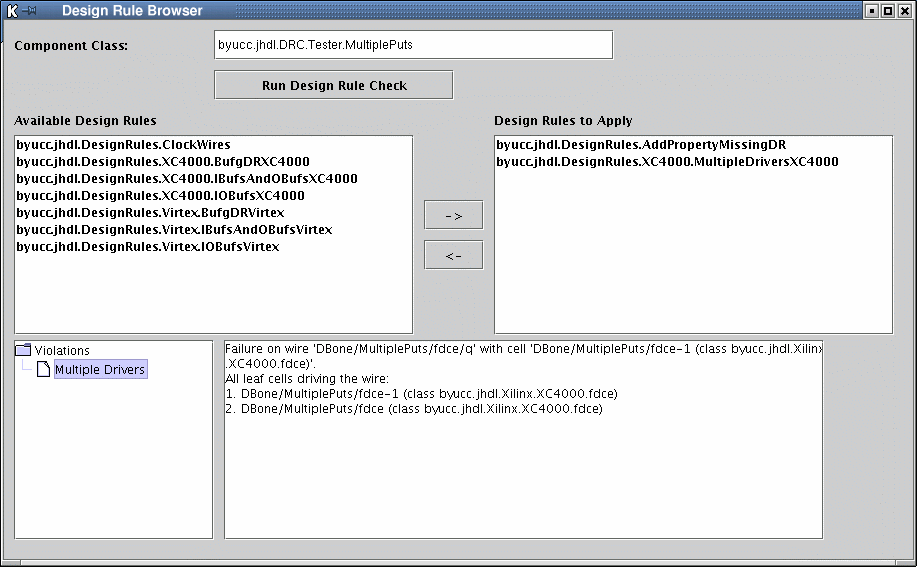
The Graphical Design Rule Browser
To view the results of a rule check graphically, call DesignRuleChecker.checkRule() with an extra parameter "true":
import byucc.jhdl.DRC.*;
import byucc.jhdl.DRC.Rules.*;
...
MultiplePutsCircuit my_MultiplePutsCircuit = new MultiplePutsCircuit(this,
i, explicit_clock, o);
DesignRuleChecker.checkRule(this, my_MultiplePutsCircuit, new MultipleDrivers(),
true);
This will launch a frame and display a tree of all violations to the rule.
You may also launch the DesignRuleBrowser independently from the command line with this command:
java byucc.jhdl.DRC.DesignRuleBrowser
You will be able to specify the full package name for a class containing a circuit you have designed. All available rules will be listed, and you can choose which rules you wish to apply to your circuit. After you run the check, the browser provides you with a list of registered violations.
To write your own design rule, extend the DesignRule class and implement the sortCells() and doCheck() methods. You can start from Template.java, which is a fully-implemented design rule that can be compiled and run through the DesignRuleChecker on any circuit:
package byucc.jhdl.DRC.Rules;
import byucc.jhdl.DRC.*;
import byucc.jhdl.base.*;
public class Template extends DesignRule {
public Template() {
name="";
description="";
oneLineDescription="";
}
/* This method will be called several times by the DesignRuleChecker
* class, once for the top-level cell and once for
each of the
* descendents of the top-level cell.
*/
public void sortCell(Cell cl) {
}
/* This method returns true if the collection of cells conforms
to the
* design rule specification, false otherwise.
*/
public boolean doCheck() {
failureReport="";
return true;
}
}
As you can see, this rule is not particularly useful. The user may fill in the code to make this rule do what he would like.
If your design rule checks for parts that are unique to any given platform (i.e., XC4000 or Virtex), then you should make your rule abstract. The methods that identify parts unique to any given platform should be abstract. You should then write the code used to identify the parts in question in classes that extend your abstract rule.
These classes are the ones that you will use as the design rule for your checker when you are ready to check your circuit. Any rule pulled from that location (byucc.jhdl.DRC.Rules) should function on any circuit, regardless of the platform. If a rule requires platform-specific checks, then the rule in byucc.jhdl.DRC.Rules should be abstract, and the implementation should exist in a package such as byucc.jhdl.DRC.Rules.Virtex or byucc.jhdl.DRC.Rules.XC4000.
Emphasizing the point - there should be no rules that refer to any specific architecture in the byucc.jhdl.DRC.Rules package.
| JHDL Doc Home Page | User's Manual Home Page |

Copyright (c) 1998-2003 Brigham Young University. All rights reserved.
Reproduction in whole or in part in any form or medium without express
permission of Brigham Young University is prohibited.
Documentation Revision: $Date: 2003/04/24 14:15:11 $